What Is Quishing? How QR Code Phishing Works and How to Stop It
Scanning a QR Code has become as routine as tapping a link — for payments, menus, parking, event check-ins, and sign-ins. That familiarity creates an opportunity for abuse. Quishing — short for QR Code phishing — uses a QR Code to hide a URL that leads to a fraudulent website, malware download, or other scam, often in place of a clickable link.
The risk comes from three factors at once: a visual lure, a destination that is difficult to inspect before scanning, and a scan that often moves the interaction from a managed computer to a personal phone.
This guide explains what quishing is, how an attack unfolds step by step, who gets targeted, and which defenses hold up against it.
What is quishing?
A traditional phishing email contains a link your security software can read, check, and block. A quishing email contains an image whose QR Code encodes the URL. Unless a security tool decodes that image, the destination is not available to the same text and link checks — and the scan may happen on a phone outside your company's controls.
Quishing sits alongside three related attacks in the phishing family:
| Attack type | Channel | Lure format | Why it evades standard defenses |
|---|---|---|---|
| Phishing | Clickable text link | Baseline threat — most filters handle it | |
| Smishing | SMS | Link inside a text message | Often bypasses corporate email controls |
| Vishing | Phone call | Voice-based social engineering | No URL to scan or filter |
| Quishing | Email, print, physical signage | QR Code hiding a URL or payload | The destination is harder to inspect before scanning; scans may happen on unmanaged devices |
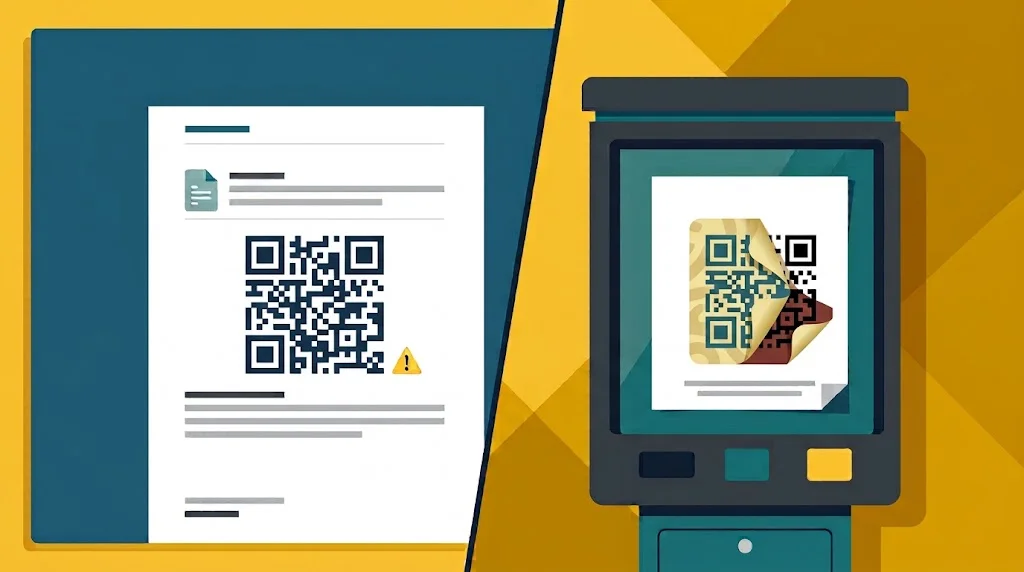
Quishing arrives through two main channels. One is email, where the code sits directly in the message body or hides inside a PDF attachment — an invoice, an HR notice, a compliance document — with instructions to scan. The other is physical: a fake sticker pasted over a legitimate code on a parking meter, kiosk, table tent, or public noticeboard.
Both rely on the same reflex — scanning without checking where the code leads.
Why quishing works
Quishing works because it combines a familiar action with an opaque destination. People are used to scanning codes in emails, on posters, and at payment terminals, but a QR Code does not show the destination as clearly as a visible link. An urgent message or a familiar logo can make the scan feel routine before anyone has checked where it leads.
The same technique can be adapted to different goals. A fake account notice may lead to a credential-harvesting page, an invoice may direct someone to a fraudulent payment portal, and a code on public signage may send visitors to a counterfeit service. The details change, but the underlying tactic is the same: borrow trust and hide the destination until after the scan.
How a quishing attack works
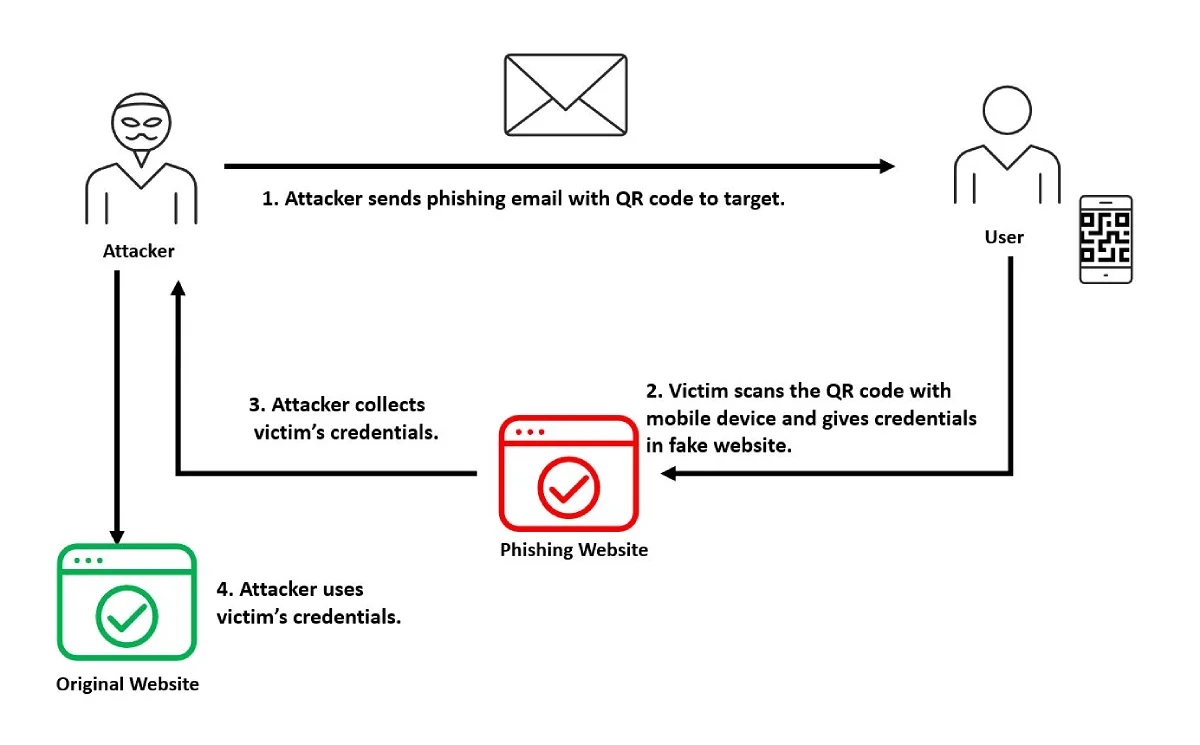
A quishing attack follows a predictable sequence: a deceptive email delivers the QR Code, the victim scans it with a phone, and a fake website captures the information they enter.
1. Send the phishing email
The attacker creates a QR Code pointing to a fake login page and places it in a message that appears to come from a trusted organization. The message may claim that the recipient needs to verify an account, update a password, or complete an urgent security check.
2. Scan the QR Code
The message encourages the recipient to scan the code with a phone. Because the QR Code hides the destination, the recipient may assume it is a safe link from the apparent sender without checking where it leads.
3. Open the fake website
The scan opens a website designed to resemble the legitimate service. The page may request a username and password, payment details, or a new authentication code.
4. Capture and misuse the information
The attacker receives the submitted information and may use it to access the real account, attempt further fraud, or target the victim in a follow-up scam. Other quishing campaigns lead to malware downloads or fraudulent payment pages, but the sequence is similar.
Why quishing evades email security
Three properties make QR Codes particularly effective for attackers:
- The payload is an image. Security tools inspect text, links, and domains. A URL rendered as black-and-white modules doesn't appear anywhere in the message's readable content. Some security products can decode QR Codes and inspect their destinations, but detection coverage varies across email security tools.
- The scan may happen on another device. People often open an email on a work computer and scan its QR Code with a personal phone. The resulting visit may take place outside the organization's usual logs, filters, and device-management controls.
- The destination can change. A dynamic QR Code points to a redirect that can be updated after the code is distributed. That flexibility is useful for legitimate campaigns, but it can also let an attacker change the destination after delivery.
Real-world quishing examples
Quishing shows up wherever people already expect to scan.
Parking meter and public-signage scams
Scammers can place a fake QR Code sticker over a legitimate code on a parking meter, café table, lobby kiosk, or public noticeboard. Someone who scans it may arrive at a fraudulent payment page or counterfeit service. The code is effective because it appears in a place where people already expect to find one.
Microsoft 365 account verification scams
A recurring email campaign impersonates Microsoft 365 alerts with claims like "your password has expired," "verify your account," or "update your MFA settings." Instead of a link, there's a QR Code leading to a convincing fake sign-in page. Because the URL is encoded in an image, filters that would catch the equivalent link-based message may miss it unless they decode the code — and some variants go further, capturing session tokens rather than just passwords.
Invoice and payment fraud
Businesses receive emails posing as vendor billing correspondence — invoices, payment reminders, account statements — each carrying a QR Code that supposedly opens billing details or supporting documents. Scanning leads to a counterfeit portal asking for banking credentials or payment authorization. Finance teams that process dozens of legitimate invoices a week are the intended audience for these campaigns.
The common thread is borrowed trust. Parking meters, Microsoft sign-in pages, and vendor invoices all carry an assumed legitimacy that attackers rely on. Overlay scams extend that further: a fake sticker applied to an otherwise genuine sign gives no visual indication that anything has changed.
Who gets targeted
Attackers concentrate on industries where document-heavy workflows make QR Codes in emails feel normal.
| Industry | Typical QR Code lure |
|---|---|
| Energy | Supplier invoices, audit paperwork, contract renewals |
| Financial services | Payment authorizations, secure document notices, account alerts |
| Manufacturing | Freight documents, purchase orders, supplier billing |
| Insurance | Policy renewals, claims portals, client login notices |
| Technology | MFA reset prompts, shared file alerts, tool sign-ins |
Within those industries, some roles attract far more attention than others:
- Executives — attractive targets because they can approve payments and access sensitive systems
- Finance teams — reviewing invoices and approving payments is routine work, so a fraudulent request looks like part of the normal workload
- IT teams — password resets and security alerts arrive constantly, so a fake MFA notice attracts little scrutiny
- HR teams — resumes, onboarding forms, and benefits documents give attackers a steady supply of plausible attachments
- Frontline workers — warehouse staff, retail employees, and field technicians encounter codes on equipment, kiosks, and payment stations that attackers can physically tamper with
Across every group, the pattern repeats: the more familiar the workflow, the less likely anyone is to pause before scanning.
How to protect yourself
You do not need to avoid QR Codes altogether. Treat a QR Code as a link whose destination stays hidden until you inspect it.
- Pause before scanning. Be cautious with unexpected QR Codes, urgent account requests, and codes placed over an existing code.
- Preview the destination. Check the URL shown by your camera or scanner before opening it. Confirm that the domain belongs to the organization you expect, and be wary of shortened links or subtle misspellings.
- Do not enter sensitive information immediately. If a scan opens a login or payment page, close it and open the official app or type the service's known address yourself.
- Report suspicious codes. Tell the organization responsible for the email, sign, or payment station so it can warn others and replace the code if necessary.
If you already entered a password, change it on the legitimate service and notify your organization. If you entered payment details, contact your bank or card provider promptly.
How to protect your organization
Defending against quishing requires closing both halves of the attack chain — the email that delivers the code and the phone that scans it.
- Deploy email security that decodes QR Codes. Filters that inspect only text cannot see the destination. Modern email security platforms decode embedded codes, resolve the hidden URLs, and check the destinations against threat intelligence before delivery. DMARC, SPF, and DKIM remain worthwhile, but they authenticate the sender rather than inspect the image.
- Require phishing-resistant MFA. Because most quishing campaigns target credentials, a stolen password should not be enough to compromise an account. Passkeys and hardware security keys cryptographically bind authentication to the legitimate site, so a fake login page cannot reuse what it captures.
- Apply least-privilege access. Assume that some attempts will succeed. If a compromised account cannot reach financial systems, customer data, or admin consoles, the impact of a single compromise stays contained.
- Train specifically for QR Code threats. General phishing awareness covers suspicious links; quishing needs its own module. Employees should learn to treat unexpected codes in emails as red flags, question urgent verification requests, and physically check whether a public code looks tampered with — misaligned stickers, damaged surfaces, codes placed where they don't belong.
- Fold quishing into security governance. The FTC, FBI, and CISA have all published warnings about QR Code phishing. Risk assessments, employee training programs, and incident response plans — particularly in regulated industries — should name quishing explicitly rather than treating it as generic phishing.
- Prepare a mobile incident playbook. When an employee reports scanning something suspicious on a personal phone, responders need a defined process: identify affected accounts, reset credentials, check for unauthorized access, and monitor for follow-up abuse. Responding quickly limits how much an attacker can do with stolen credentials.
No single control catches everything. The organizations that handle quishing best combine QR Code-aware email security, strong authentication, limited access, trained employees, and rehearsed response procedures.
A note on the QR Codes your business creates
Quishing is about malicious codes, but every organization also creates legitimate ones for menus, packaging, campaigns, and documentation. Those codes deserve the same scrutiny you'd want applied to anyone else's.
If you're publishing dynamic codes, choose infrastructure that treats destination safety as part of the service. On QRBYT, every redirect passes through an abuse detection service that screens destinations against continuously updated threat intelligence, and blocked codes show a clear warning page instead of loading the harmful URL. We cover how that system works in our Trust & Safety overview, and anyone can flag a suspicious code through our abuse report form.
Verified destinations, scan visibility, and controlled redirects won't stop someone else's phishing campaign, but they keep the codes you publish safe to scan for as long as they remain in circulation.
Key takeaways
- Quishing hides a malicious URL inside a QR Code image, making it harder for text-scanning email filters to inspect the destination
- The scan may move the interaction from a managed work computer to a personal phone outside the organization's usual security controls
- Many quishing campaigns target credentials, often impersonating familiar account-verification flows
- Physical overlay scams — fake stickers on parking meters, kiosks, and signage — exploit places where scanning already feels routine
- Effective defense combines QR Code-aware email security, phishing-resistant MFA, least-privilege access, targeted training, and a mobile incident response plan
- For the codes you publish yourself, use dynamic codes behind verified, monitored destinations — destination screening and immediate blocking keep them safe to scan after distribution