How do QR Codes Encode Data?
QR Codes — short for Quick Response codes — are everywhere: restaurant menus, product packaging, event tickets, and business cards. You scan one with your phone and instantly land on a website, save a contact, or connect to Wi-Fi. But how does a grid of black and white squares actually carry that information?
This article breaks down the structure of a QR Code, the encoding process behind it, and why the technology is far more resilient than it looks.
What makes a QR Code different from a barcode
Before diving into encoding, it helps to understand why QR Codes exist at all.
Traditional barcodes are one-dimensional. A scanner reads them in a single horizontal line, and they max out at roughly 80 characters — enough for a product ID, not much else.
QR Codes are two-dimensional. Scanners read them both horizontally and vertically, which lets them store significantly more data: up to 7,089 numeric characters, 4,296 alphanumeric characters, or 2,953 bytes of binary data.
That jump in capacity is what makes QR Codes useful for URLs, contact cards, Wi-Fi credentials, and more — things a barcode simply cannot handle.
The anatomy of a QR Code
Every QR Code is built from the same set of structural elements. These aren't random — each one serves a specific purpose that helps scanners locate, orient, and decode the data.
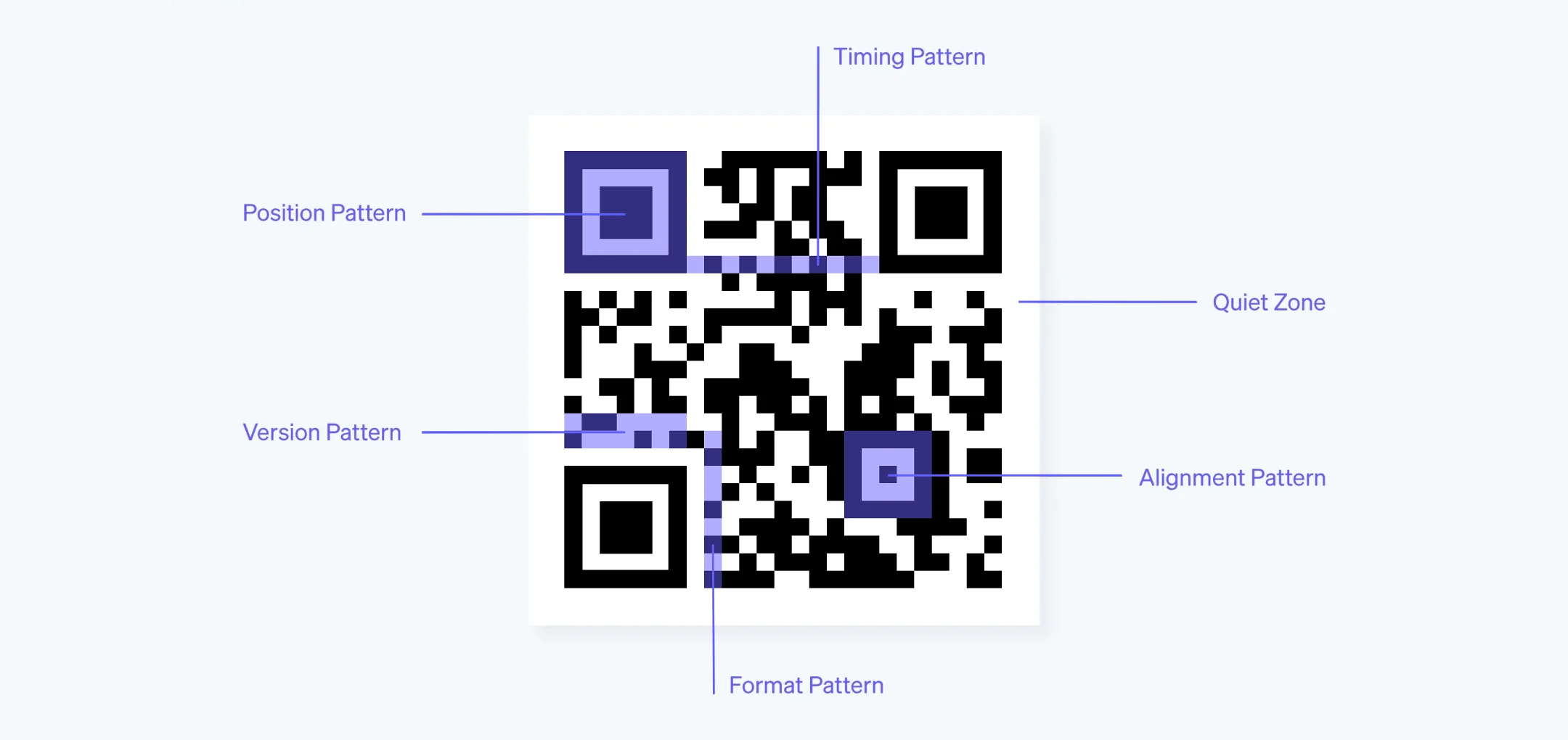
Position patterns
The three large squares in the corners (top-left, top-right, bottom-left) are position patterns. They tell the scanner where the QR Code is, what orientation it's in, and how large it is. This is why QR Codes can be scanned at an angle or upside down.
Alignment pattern
Larger QR Codes include a smaller square pattern (typically near the bottom-right) that helps correct for distortion. If the code is printed on a curved surface like a bottle, the alignment pattern keeps the scan accurate.
Timing patterns
The alternating black-and-white lines running between the position patterns — one horizontal, one vertical — establish the grid's coordinate system. They tell the scanner exactly how many rows and columns the data matrix contains.
Format pattern
Stored next to the position patterns, this section contains two critical pieces of metadata: the error correction level and the data mask pattern used. The scanner reads this first so it knows how to interpret everything else.
Version pattern
QR Codes come in 40 versions. Version 1 is a 21×21 grid; version 40 is a 177×177 grid. Versions 7 and above include dedicated version pattern cells so the scanner knows the exact grid size.
Quiet zone
The blank margin (at least 4 modules wide) surrounding the entire QR Code. Without it, scanners may confuse the code's edge with surrounding content and fail to read it.
How data gets encoded step by step
Generating a QR Code isn't just about turning text into black squares. The process involves several well-defined stages.
1. Choose the encoding mode
QR Codes support four encoding modes, each optimized for a different type of data:
| Mode | Characters | Bits per character | Best for |
|---|---|---|---|
| Numeric | 0–9 | 3.33 | Phone numbers, IDs |
| Alphanumeric | 0–9, A–Z, space, $%*+-./: | 5.5 | Short URLs, codes |
| Byte | Full ISO 8859-1 / UTF-8 | 8 | URLs, emails, text |
| Kanji | Shift JIS characters | 13 | Japanese text |
The encoder picks the most efficient mode for the input data. Some generators even mix modes within a single QR Code to minimize size.
2. Encode the data as a bit stream
The input characters are converted into binary according to the selected mode's rules. A mode indicator (4 bits) and a character count indicator are prepended. Terminator bits are added at the end.
For example, the number 8675309 in numeric mode gets split into groups of three digits, each converted to a 10-bit binary value.
3. Generate error correction codewords
Using Reed-Solomon error correction, the encoder generates additional codewords from the data. These codewords don't carry new information — they carry enough redundancy for the scanner to reconstruct damaged or missing data.
4. Arrange data in the matrix
The data and error correction bits are placed into the grid in a specific zig-zag pattern, starting from the bottom-right corner and working upward. The structural elements (position patterns, timing patterns, etc.) are already reserved — data fills only the remaining modules.
5. Apply a mask pattern
To prevent patterns that could confuse scanners (like large uniform areas), one of eight predefined mask patterns is applied to the data region. The encoder tests all eight and picks the one that produces the most balanced result.
6. Add format and version patterns
Finally, the format string (error correction level + mask ID) and version string are written into their reserved positions. The QR Code is complete.
Error correction: why damaged QR Codes still scan
One of the most practical features of QR Codes is their built-in error correction. Even if part of the code is scratched, stained, or covered by a logo, it can still be read.
QR Codes use four error correction levels:
| Level | Recovery capacity | Use case |
|---|---|---|
| L (Low) | ~7% | Clean environments, maximum data capacity |
| M (Medium) | ~15% | General use (most common default) |
| Q (Quartile) | ~25% | Industrial, outdoor signage |
| H (High) | ~30% | Codes with logos, heavy-wear environments |
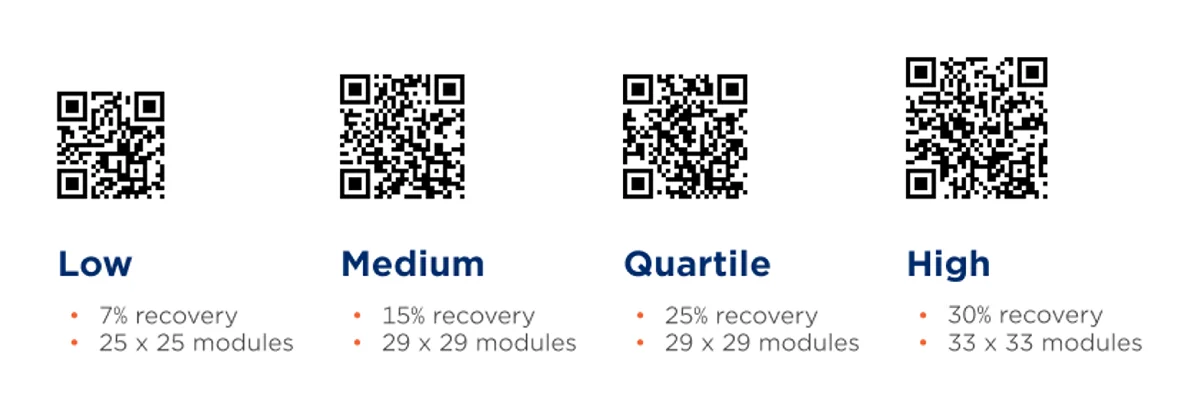
This is powered by Reed-Solomon coding — the same math used in CDs, DVDs, and satellite communications. The encoder adds redundant data blocks that let the decoder reconstruct missing portions.
This is also why you can place a logo in the center of a QR Code. The logo effectively "damages" those modules, but if the error correction level is high enough (typically Q or H), the surrounding redundancy compensates.
Versions, sizes, and capacity
QR Codes scale through a version system:
- Version 1: 21×21 modules (smallest)
- Version 10: 57×57 modules
- Version 40: 177×177 modules (largest)
Each step up adds 4 modules per side. Higher versions hold more data but produce denser codes that require higher-resolution printing and closer scanning distances.
For most real-world uses — a URL, a Wi-Fi password, a vCard — versions 1 through 10 are more than enough. You'll rarely encounter anything above version 20 outside of industrial applications.
What types of data can QR Codes store
QR Codes encode raw data. What happens when you scan one depends on what that data represents:
| Data type | What happens on scan |
|---|---|
| URL | Opens the website in a browser |
| Plain text | Displays the text on screen |
| vCard | Prompts to save a contact |
| Wi-Fi credentials | Prompts to join the network |
| Email address | Opens a pre-filled email draft |
| SMS | Opens a pre-filled text message |
| Calendar event | Prompts to add an event |
| Geographic coordinates | Opens in a maps app |
The QR Code itself doesn't "know" it's a URL or a vCard — it just stores a string of characters. Your phone's scanner recognizes the format and acts accordingly.
Static vs. dynamic QR Codes
There's one more distinction worth understanding, and we cover it in depth in our static vs dynamic QR Codes guide:
- Static QR Codes encode the destination data directly. The URL or text is baked into the modules. To change it, you need a new QR Code.
- Dynamic QR Codes encode a short redirect URL. When scanned, the redirect URL forwards to your actual destination. You can change the destination at any time without reprinting the code.
Dynamic codes also enable scan tracking — you can see how many times the code was scanned, when, where, and on what device.
Key takeaways
- QR Codes store data in a 2D grid of black and white modules, read both horizontally and vertically
- The encoding process involves mode selection, binary conversion, Reed-Solomon error correction, matrix placement, and masking
- Error correction (7–30% recovery) means damaged or logo-covered codes still scan reliably
- 40 versions scale from 21×21 to 177×177 modules
- Dynamic QR Codes add redirect flexibility and scan analytics on top of the base encoding
Bulk QR Code Creation: A Guide for Growing Teams
Learn why generating QR Codes in bulk is essential for growing teams — from saving time and reducing errors to enabling personalization and scan analytics at scale.
How to Add a QR Code to an Invitation
Learn where to place a QR Code on wedding, birthday, and event invitations, what to link to, how to size it correctly, and which mistakes cause scan failures.