How to Choose the Right QR Code Size for Any Surface
QR Codes show up on everything from product labels to highway billboards. They all share the same underlying structure, but their physical dimensions vary enormously — and getting the size wrong is one of the fastest ways to guarantee a failed scan.
A code that's too small for its environment becomes a blurry smudge that no camera can decode. A code that's too large overflows the camera's field of view and can't be captured in a single frame. Both failures are entirely preventable once you understand the relationship between scanning distance, print surface, and data complexity.
This guide covers the core sizing formula, practical minimum and maximum dimensions, the environmental factors that shift those thresholds, and concrete size recommendations for the most common real-world placements.
The distance-to-size rule
The single most reliable sizing guideline is the 10:1 distance-to-size ratio. It states that a QR Code's width should be at least one-tenth of the distance from which it will be scanned.
The formula is straightforward:
QR Code width = scanning distance / 10
| Scanning distance | Minimum QR Code width |
|---|---|
| 30 cm (about 1 ft) | 3 cm |
| 1 m (about 3.3 ft) | 10 cm |
| 10 m (about 33 ft) | 1 m |
| 50 m (about 164 ft) | 5 m |
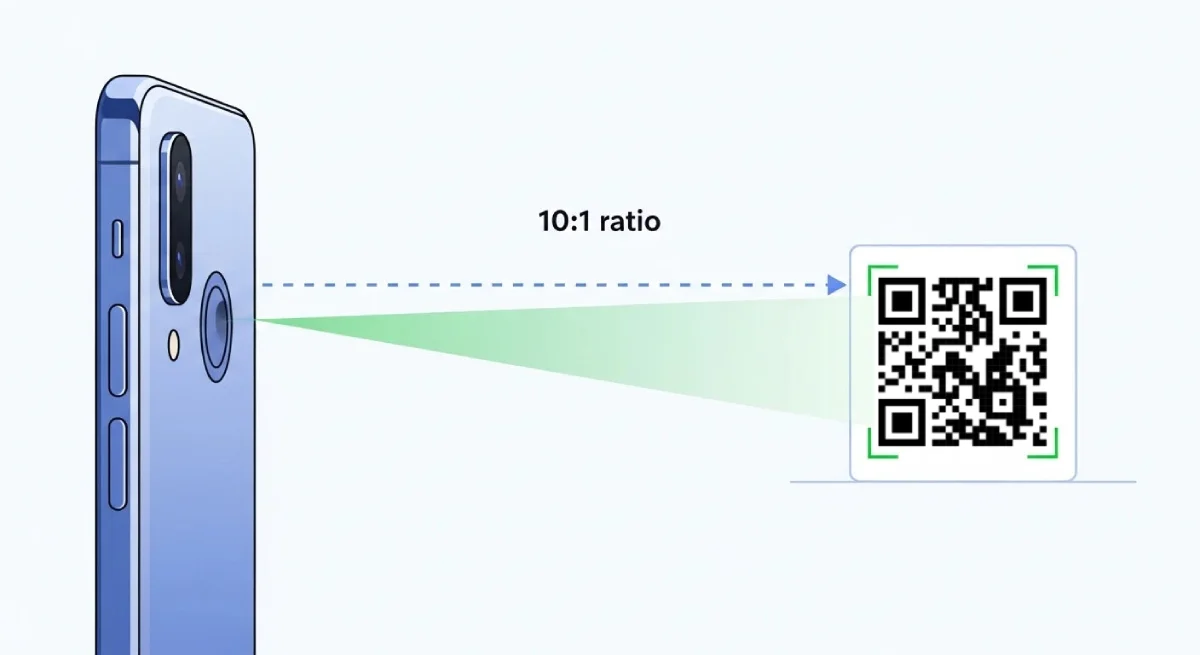
A QR Code on a restaurant table tent will be scanned from roughly 30 cm, so 3 cm is the minimum width. A code on a billboard viewed from 20 meters needs to be at least 2 meters across.
This ratio is a starting point, not an absolute. Camera quality, ambient lighting, code density, and surface material all influence the real-world threshold. The safest approach is always to apply the formula first, then test in the actual scanning environment.
Minimum and maximum dimensions
How small can a QR Code be?
The ISO 18004 standard — the international specification governing QR Code symbology — permits a Version 1 code (21 x 21 modules) to be printed as small as 1 x 1 cm. In practice, that size is only viable for industrial scanning systems with high-precision optics and controlled lighting.
For everyday smartphone scanning, the practical floor is 2 x 2 cm (0.8 x 0.8 inches). This accounts for the range of camera quality across modern phones, typical print resolution, and normal indoor lighting.
A safer baseline is 2.5 x 2.5 cm (1 x 1 inch). At that size, even older devices, slightly imperfect prints, and codes with moderate data density remain reliably scannable.
Minimum pixel dimensions for screens
QR Codes displayed on digital screens don't have a fixed physical size — pixel resolution determines whether the code is sharp enough to scan.
| Physical size on screen | Minimum resolution | Typical context |
|---|---|---|
| ~1 x 1 cm | 38 x 38 px | Compact UI elements |
| ~2 x 2 cm | 76 x 76 px | General-purpose display |
| No fixed size (web) | 150 x 150 px or more | Websites, emails, digital ads |
| Presentation slides | 300 x 300 px or more | Conference screens, projectors |
| Large digital signage | 500 x 500 px or more | LED boards, stadium screens |
Going below these thresholds risks producing a code that looks acceptable on the author's screen but blurs or pixelates on the viewer's device.
Upper limits
There is no hard maximum size for a QR Code. It can be as large as the surface allows. The constraint comes from the scanning device: if the code exceeds the camera's field of view at the intended distance, the scanner cannot capture the entire pattern in a single frame and the scan fails.
In practice, the 10:1 rule handles this naturally. A code designed for a 10-meter scanning distance at 1 meter wide will fit comfortably in a modern phone camera's field of view from that distance.
The quiet zone
Every QR Code requires a blank margin — called the quiet zone — around its entire perimeter. Without it, scanners cannot reliably distinguish the code's edge from surrounding content. The anatomy of a QR Code includes a deeper look at this and other structural elements.
The minimum quiet zone width is four modules (the smallest square units in the code) on every side. As the code scales up, the quiet zone must scale with it.
| Code size category | Recommended quiet zone |
|---|---|
| Small (under 5 cm) | At least 6 mm on all sides |
| Large (5 cm+) | At least 15% of the total code width per side |
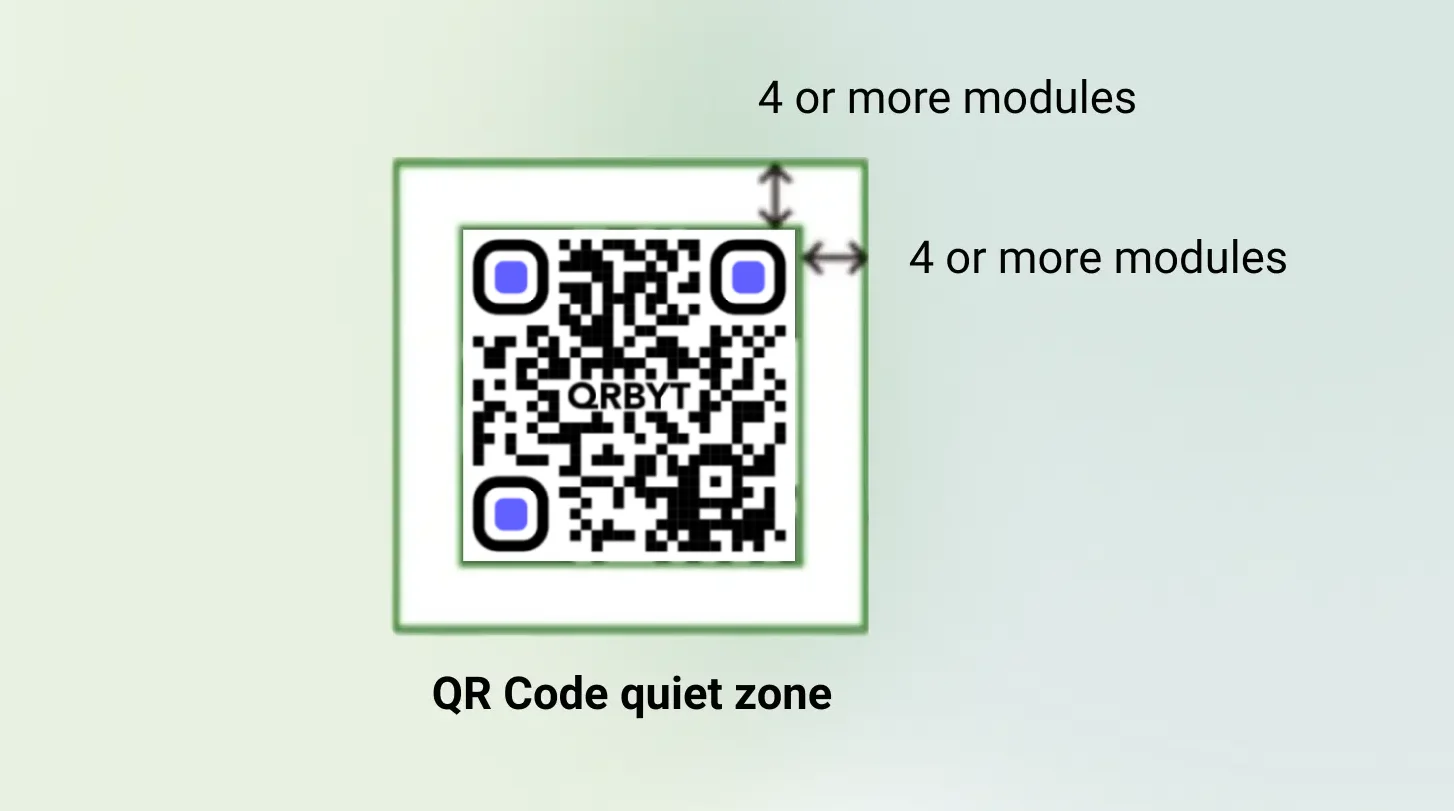
Crowding the code's edges with text, logos, or design elements is one of the most common causes of scan failure — and one of the easiest to prevent.
Factors beyond size that affect scannability
Dimensions alone don't guarantee a successful scan. Several technical and environmental variables interact with size to determine whether a QR Code works in the field.
Data density and error correction
The amount of data encoded in a QR Code directly affects its module density. A code storing a 20-character URL produces a simple, open grid. A code storing a 200-character URL — or a full vCard — packs far more modules into the same space, shrinking each individual square.
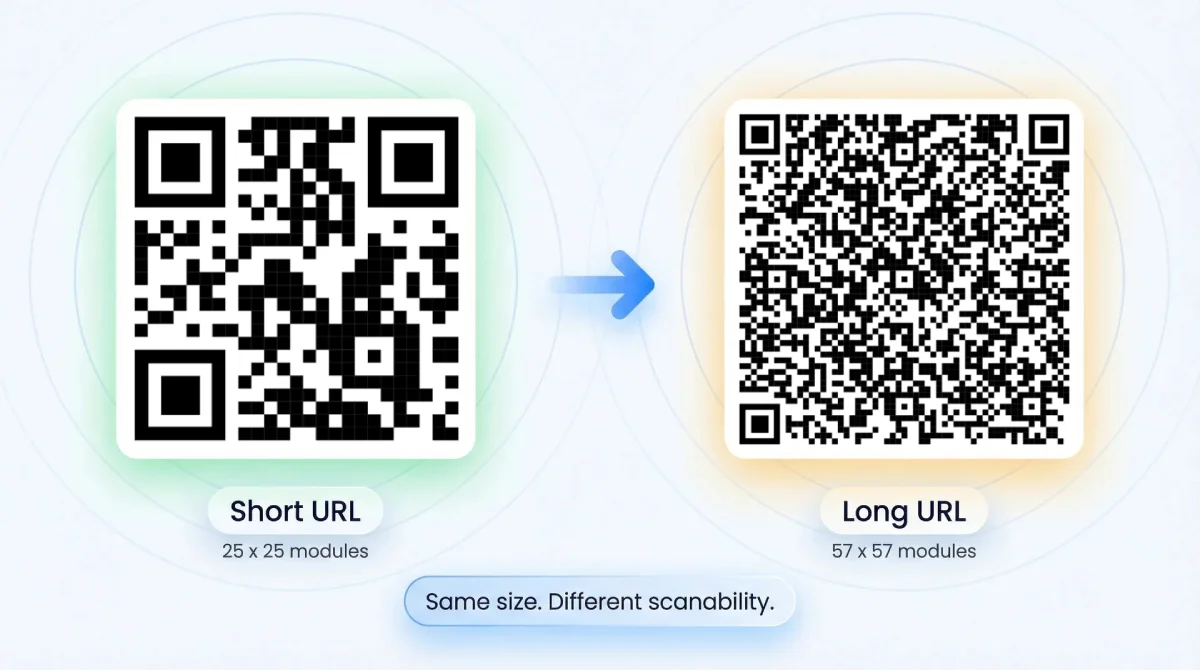
Denser codes need more physical space to remain scannable. If you're working with long URLs or complex data, increase the code's dimensions beyond the 10:1 baseline.
Error correction amplifies this effect. QR Codes support four error correction levels — L (7% recovery), M (15%), Q (25%), and H (30%) — and each step up adds redundant modules that increase density. Level H, commonly used when a logo overlays the center of the code, produces the densest pattern and demands the most physical space. Our encoding deep dive covers the mechanics in detail.
One effective way to reduce density is to use a dynamic QR Code. Because dynamic codes encode a short redirect URL rather than the full destination, the resulting pattern stays compact regardless of how long the actual target URL is.
Print resolution and display quality
A QR Code that looks crisp on screen can fall apart on paper if the print resolution is too low. For physical prints, 300 DPI is the minimum for sharp, scannable output. Below that threshold, module edges blur together and scanners struggle to differentiate black from white.
Vector formats — SVG, PDF, and EPS — scale to any print size without quality loss. Raster formats (PNG, JPG) should only be used at their native resolution or smaller. Stretching a low-resolution raster image to fill a poster guarantees a blurry, unreliable code.
For digital displays, the pixel minimums from the table above apply. A code that renders cleanly on a laptop screen may become unreadable when projected onto a conference room wall if the source resolution is too low.
Surface material and environment
The physical surface carrying the QR Code matters more than most people expect.
Glossy and reflective materials cause glare under direct lighting, which can wash out modules and prevent scanning. Matte finishes scan more reliably in nearly every condition.
Curved surfaces — bottles, tubes, cylindrical packaging — distort the grid geometry. The alignment patterns built into QR Codes compensate to a degree, but tight curves still degrade scan reliability. Increasing the code's dimensions helps offset the distortion.
Low light and shadows reduce contrast between modules and background. Codes in dimly lit environments benefit from larger sizing and higher contrast ratios.
Color and contrast
QR Code scanners depend on strong contrast between the dark modules and the light background. The minimum recommended contrast ratio is 4:1, though higher is always better.
Dark modules on a light background is the standard and most reliable configuration. Inverted schemes (light modules on a dark background) cause scan failures across many devices and should be avoided entirely.
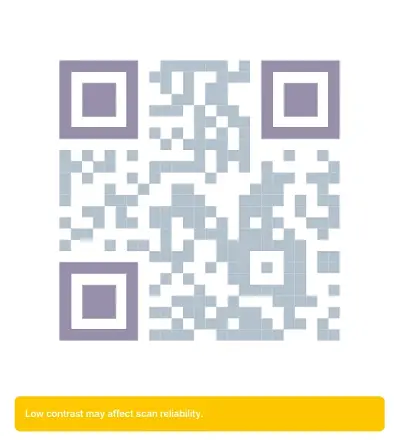
If you're customizing colors, always apply them during code generation — not after the fact in an image editor. Recoloring an exported code risks shifting contrast below the scannable threshold.
Recommended sizes by use case
The right dimensions depend on where the code will live and how far away the scanner will be. The table below summarizes the most common placements:
| Use case | Scanning distance | Recommended minimum size | Key consideration |
|---|---|---|---|
| Business cards | A few centimeters | 2 x 2 cm (0.8 x 0.8 in) | Keep encoded data minimal; maintain high contrast |
| Product packaging and labels | Arm's length or closer | 1.5 x 1.5 cm to 2 x 2 cm | Avoid glossy or tightly curved surfaces |
| Flyers, brochures, and magazines | 30–70 cm (1–2.5 ft) | 2 x 2 cm to 3 x 3 cm | Place away from folds and edges; pair with a clear CTA |
| Posters and indoor signage | 1–3 m (3–10 ft) | 10 x 10 cm to 30 x 30 cm | Position at eye level in high-traffic areas |
| Digital displays and presentations | 1–6 m (3–20 ft) | 5 x 5 cm to 60 x 60 cm | Use high pixel density; minimum 300 px for slides |
| Billboards and outdoor ads | 10–50 m (30–160 ft) | 1 x 1 m to 5 x 5 m | Export as vector; mount at accessible height |
| Event tickets | A few centimeters | 2 x 2 cm to 3 x 3 cm | Test thoroughly with any logo or color customization |
| Restaurant table tents | A few centimeters | 2 x 2 cm to 5 x 5 cm | Laminate the surface; link to a dynamic menu for easy updates |
Business cards
Space is tight on a standard 9 x 5 cm card, and the scanning distance is essentially zero — the scanner is held directly over the card. A 2 x 2 cm code works reliably here, provided you keep the encoded data short. A vCard with a full address, phone number, and URL produces a denser pattern than a simple URL — if you need all that data, size up to 2.5 cm or use a dynamic code to keep the pattern compact.
Flyers and print marketing
Flyers and brochures are typically scanned at arm's length. A 2 x 2 cm to 3 x 3 cm code handles this comfortably. Placement matters as much as size: avoid positioning the code near a fold, in a corner that might get trimmed, or against a busy background that eats into the quiet zone. A clear call to action next to the code ("Scan for details") noticeably improves engagement.
Posters and indoor signage
Indoor posters are scanned from 1 to 3 meters away. Applying the 10:1 rule, a poster in a hallway scanned from 2 meters needs a code at least 20 cm wide. Place the code at eye level — codes mounted too high or too low force awkward scanning angles that reduce reliability. Maximize contrast against the poster's background design.
Billboards and large-format outdoor
Outdoor billboards present the most extreme sizing challenge. A code intended for pedestrians 10 meters away needs to be at least 1 meter across. Highway billboards viewed from 30 to 50 meters demand 3 to 5 meter codes — and even then, scanning from a moving vehicle is unreliable at best.
For outdoor placements, always export the QR Code as a vector file (SVG, PDF, or EPS) so it scales cleanly to any print size. Mount the signage at a height and angle that allows pedestrians or stopped traffic a clear, straight-on view.
Restaurant table tents
Table tents sit directly in front of the diner, so scanning distance is minimal. A 3 x 3 cm code is more than sufficient. Laminating the card prevents wear but introduces a slightly glossy surface — matte laminate is the better choice. Linking the code to a dynamic QR Code lets you update the menu, swap promotions, or adjust pricing without reprinting a single tent.
Common sizing mistakes and how to avoid them
Blurry or pixelated output
This almost always traces back to exporting the code as a low-resolution raster image and then scaling it up for print. A 200 x 200 px PNG stretched to fill a poster will be unreadable. Generate your codes at the final output size, use 300+ DPI for print, and prefer vector formats that scale without quality loss.
Ignoring the quiet zone
Designers frequently push text, logos, or decorative elements right up to the code's edge, eliminating the quiet zone. The scanner needs that blank margin to detect where the code begins and ends. Maintain at least four modules of clear space on every side and scale the margin proportionally as the code gets larger.
Overcrowding with data
Long URLs, detailed vCard fields, and large blocks of text all inflate module density. If the code's physical size doesn't increase to match, the individual modules become too small for cameras to resolve. Shorten URLs where possible, strip unnecessary parameters, and consider dynamic codes — they encode a short redirect regardless of how long the final destination is.
Wrong size for the scanning distance
A 2 cm code on a poster meant to be scanned from 3 meters away simply won't work. Apply the 10:1 rule as your first step, then validate by scanning the printed code from the intended distance on at least two or three different phones.
Printing on difficult surfaces
Glossy packaging reflects light. Curved bottles distort the grid. Textured materials can interfere with module edges. When the surface is less than ideal, increase the code's size beyond what the 10:1 rule suggests, switch to a matte finish where possible, and test under the actual lighting conditions the code will face.
Key takeaways
- Use the 10:1 distance-to-size ratio as your starting point: QR Code width = scanning distance / 10
- The practical minimum for smartphone scanning is 2 x 2 cm; a safer baseline is 2.5 x 2.5 cm
- Every QR Code needs a quiet zone of at least four modules on all sides — without it, scanners cannot detect the code reliably
- Data density and error correction level directly affect how much physical space a code needs — denser codes require larger dimensions
- Export as vector (SVG, PDF, EPS) for print and use 150+ px minimum for web display
- Surface, lighting, and contrast all shift the effective size threshold — matte surfaces, strong contrast, and good lighting improve scan reliability
- Always test in real-world conditions on multiple devices before committing to a final size
How to Add a QR Code to an Invitation
Learn where to place a QR Code on wedding, birthday, and event invitations, what to link to, how to size it correctly, and which mistakes cause scan failures.
QR Codes in Manufacturing: Reducing Downtime and Data Gaps
Learn how manufacturers use QR Codes to improve maintenance, inventory accuracy, production visibility, and compliance, plus a practical rollout plan that avoids common failures.